Distributed indexing
If you use a cluster to deploy Seafile, you can use distributed indexing to realize real-time indexing and improve indexing efficiency. The indexing process is as follows:
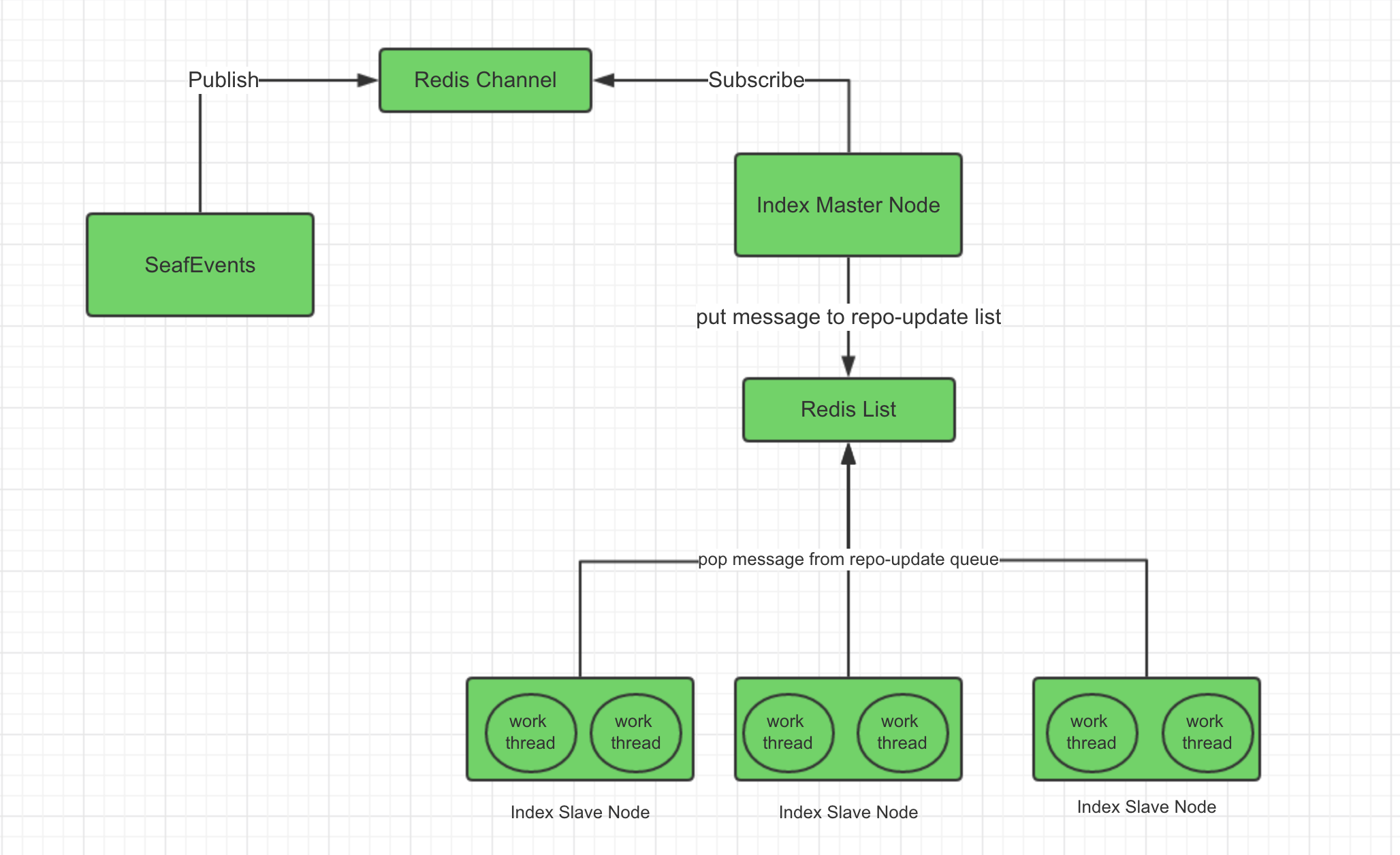
Prepare for distributed indexing
Distributed indexing requires using Redis as cache server instead of Memcached.
Disable existing indexing
To use distributed indexing, you have to first disable existing single node indexing.
Modify the seafevents.conf on the backend node
[INDEX FILES]
enabled=true
     |
     V
enabled=false
Restart Seafile
docker exec -it seafile bash
cd /scripts
./seafile.sh restart && ./seahub.sh restart
cd /opt/seafile/seafile-server-latest
./seafile.sh restart && ./seahub.sh restart
Deploy distributed indexing
First, prepare a index-server master node and several index-server slave nodes, the number of slave nodes depends on your needs. Copy the seafile.conf and the seafevents.conf in the conf directory from the Seafile frontend nodes to /opt/seafile-data/seafile/conf in index-server nodes. The master node and slave nodes need to read the configuration files to obtain the necessary information.
mkdir -p /opt/seafile-data/seafile/conf
mkdir -p /opt/seafile
Then download .env and index-server.yml to /opt/seafile in all index-server nodes.
cd /opt/seafile
wget https://manual.seafile.com/13.0/repo/docker/index-server/index-server.yml
wget -O .env https://manual.seafile.com/13.0/repo/docker/index-server/env
Modify mysql configurations in .env.
SEAFILE_MYSQL_DB_HOST=<your mysql host>
SEAFILE_MYSQL_DB_PORT=3306
SEAFILE_MYSQL_DB_USER=seafile
SEAFILE_MYSQL_DB_PASSWORD=PASSWORD

REDIS_HOST=<your redis host>
REDIS_PORT=6379
REDIS_PASSWORD=

CLUSTER_MODE=master
Note
CLUSTER_MODE needs to be configured as master on the master node, and needs to be configured as worker on the slave nodes.
Next, create a configuration file index-master.conf in the conf directory of the master node, e.g.
[DEFAULT]
interval=600
Start master node.
docker compose up -d
Next, create a configuration file index-worker.conf in the conf directory of all slave nodes, e.g.
[DEFAULT]
index_workers=2
Start all slave nodes.
docker compose up -d
Some commands in distributed indexing
Rebuild search index, first execute the command in the Seafile node:
cd /opt/seafile/seafile-server-last/
./pro/pro.py search --clear
Then execute the command in the index-server master node:
docker exec -it index-server bash
/opt/seafile/index-server/index-server.sh restore-all-repo
List the number of indexing tasks currently remaining, execute the command in the index-server master node:
/opt/seafile/index-server/index-server.sh show-all-task